Introduction
❎ Le but de cette présentation n'est pas:
- de vous vanter les mérites de Rust (pour rappel: Performance, Reliability, Productivity)
- de vous apprendre l'exhaustivité des bases du langage (types de données, comment faire une boucle, pattern matching...)
✅ Le but de cette présentation est:
- de faire en sorte que votre appropriation du langage soit agréable 💖
- de vous faire comprendre les mécanismes qui sous-tendent Rust
- d'expliquer comment Rust peut se vanter d'apporter des garanties de fiabilité et de performance
Une structure de donnée
Voici mon chat, Grispoil, 2 ans, en plein effort.

En Rust, un chat ça peut ressembler à ça:
#![allow(unused)]
fn main() {
// A data type definition
struct Cat {
  age: u8,
  pub name: String,
}
}
Syntaxe de fonction
En Rust, un chat ça peut ressembler à ça:
#![allow(unused)]
fn main() {
// A data type definition
struct Cat {
  age: u8,
  pub name: String,
}

fn do_nothing() {
  // (=ↀωↀ=)✧
}

fn still_do_nothing() -> () {
  // ლ(=ↀωↀ=)ლ
}

fn get_age(cat: Cat) -> u8 {
  return cat.age;
}

// Or better...

fn get_age_bis(cat: Cat) -> u8 {
  cat.age
}
}
Inférence de type, mutabilité
La mutabilité est vérifiée pour chaque variable. Le compilateur Rust valide que chaque utilisation de variable est faite dans le bon contexte, sans quoi, ça ne compile pas.
struct Cat {
  age: u8,
}

fn main() {
  // Immutable variable by default
  let age_sample = 3;
  let my_cat = Cat { age: 2 };

  // Read only is OK
  println!("My cat is {} years old.", my_cat.age);

  // Write is KO
  // my_cat.age = 3;
}
Héritage de mutabilité
En Rust, la mutabilité est héritée.
struct Necklace {
  text: String
}

struct Cat {
  age: u8,
  necklace: Necklace
}

fn main() {
  // Immutable
  let my_cat = Cat {
    age: 2,
    necklace: Necklace { text: "Purrfect".to_string() }
  };

  // Write is KO
  // my_cat.age = 3;
  // my_cat.necklace.text += " cat";

    // Read only is OK
  println!("My cat's necklace has a message: {}", my_cat.necklace.text);
}
Mutabilité externe et interne
Rust fait la distinction entre mutabilité externe et interne.
Exemple:
use std::cell::RefCell;

fn main() {
  let x = 42;
  // Fail... try adding mut
  // x = 43;
  println!("x={}", x);

  let my_list = vec![1, 2, 3, 4];
  // Also fail... try adding mut
  // my_list.push(5);
  println!("list: {:?}", my_list);

  // To go further...
  let my_list = RefCell::new(vec![1, 2, 3, 4]);
  my_list.borrow_mut().push(5);
  println!("refcell: {:?}", my_list.borrow());
}
Il est généralement déconseillé dans le cas général (et je déconseille personnellement) d'utiliser la mutabilité interne.
En effet, dans ce cas le borrowing n'est vérifié qu'au runtime. De plus, l'écriture d'un tel code devient rapidement confus.
Bien souvent, il est possible de procéder autrement pour contourner le problème rencontré par le compilateur.
Variables et références
En Rust, on peut posséder:
- une instance
my_cat: Cat - une instance mutable
mut my_cat: Cat - une référence
my_cat: &Cat - une référence mutable
my_cat: &mut Cat
| Syntaxe Rust | Description |
|
Je te donne mon chat. Je ne l'ai plus.
Une seule personne peut posséder le chat à la fois. |
|
Je te donne mon chat, et tu peux immédiatement le modifier. Je ne l'ai plus.
Une seule personne peut posséder le chat à la fois. |
|
Je te laisse regarder mon chat, mais je le garde. Tu ne peux rien lui faire, juste l'observer.
Plusieurs personnes peuvent admirer mon chat en même temps. |
|
Je te laisse faire des trucs avec mon chat, mais je le garde. Tu me le rends après.
Une seule personne peut avoir le chat en même temps. |
Dessine moi un chat
struct Cat {
  age: u8,
}

/// The impl keyword is used to implement functions related to a type.
impl Cat {
  pub fn new(age: u8) -> Self {
    Cat { age: age }
  }

  fn age(&self) -> u8 {
    self.age
  }

  fn birthday(&mut self) {
    self.age += 1;
  }

  fn explode(self) {
    println!("this {} year old cat is an exploding kitten!", self.age);
  }
}

fn main () {
  let mut my_cat = Cat::new(2);
  println!("It is {} years old.", my_cat.age());
  my_cat.birthday();

  // Move
  let also_my_cat = my_cat;

  // Errors
  // println!("It is {} years old.", my_cat.age());

  println!("It is {} years old.", also_my_cat.age());
  also_my_cat.explode();

  // Also errors
  // also_my_cat.birthday();
}
C'est quoi un Trait ? 📏
Un Trait est une abstraction permettant de définir des comportements partagés associés à des types.
Source: Rust Book ch.10.2
En gros, un Trait est presque l'équivalent d'une Interface dans d'autres langages.
Un exemple de Trait 🐈
trait Pet {
  fn species(&self) -> String;
}

struct Cat {
  age: u8,
}

impl Cat {
  fn age(&self) -> u8 {
      self.age
  }
}

/// impl is also used to provide the implementation of a trait to a type.
impl Pet for Cat {
  fn species(&self) -> String {
      "cat".to_string()
  }
}

fn main() {
  let my_cat = Cat {
    age: 2,
  };

  println!("This is a {}.", my_cat.species());
  println!("It is {} years old.", my_cat.age());
  println!("Its memory footprint is {} byte(s).", size_of_val(&my_cat));
}
Les principaux traits de Rust
Le compilateur Rust importe automatiquement un sous-ensemble de choses essentielles dans tous les programmes Rust: il s'agit des prelude.
Les 26 traits au coeur de Rust
| v1 | marker | ops | iter | convert | others |
|---|---|---|---|---|---|
| Send | Clone | Drop | DoubleEndedIterator | AsMut | ToOwned |
| Sized | Copy | Fn | ExactSizeIterator | AsRef | ToString |
| Sync | Default | FnMut | Extend | From | |
| Unpin | Eq | FnOnce | IntoIterator | Into | |
| Ord | Iterator | ||||
| PartialEq | |||||
| PartialOrd |
Auxquels on peut ajouter les Traits notables suivants: Display, Debug, et tous les traits std::ops
Copy & Clone : L'age de mon chat
struct Cat {
  age: u8,
}

impl Cat {
  fn age(&self) -> u8 {
      self.age
  }
}

fn main() {
  let my_cat = Cat { age: 2 };

  println!("It is {} years old.", my_cat.age());
  println!("Its memory footprint is {} byte(s).", size_of_val(&my_cat));
}
Copy & Clone : Le nom de mon chat
struct Cat {
  age: u8,
  name: String,
}

impl Cat {
  fn age(&self) -> u8 {
      self.age
  }

  fn name(&self) -> String {
    self.name
  }
}

fn main() {
  let my_cat = Cat { age: 2, name: "Grispoil".to_string() };

  println!("It is {} years old.", my_cat.age());
  println!("Its name is {}.", my_cat.name());
  println!("Its memory footprint is {} byte(s).", size_of_val(&my_cat));
}
Pourquoi cette implémentation de méthode fonctionne pour l'age, mais pas pour le nom ?
Car le type
u8implémente le trait Copy, mais pas le typeString.
Copy & Clone : L'age de mon chat est copié
struct Cat {
  age: u8,
}

impl Cat {
  fn age(&self) -> u8 {
    println!("addresse de l'age dans mon chat: {:p}", &self.age);
    self.age
  }
}

fn main() {
  let my_cat = Cat { age: 2 };

  println!("addresse de l'age retourné: {:p}", &my_cat.age());
}
Trait: Pointer
Fonctionnement de la stack (1/2)
La stack sert à suivre le flot d'exécution du programme.
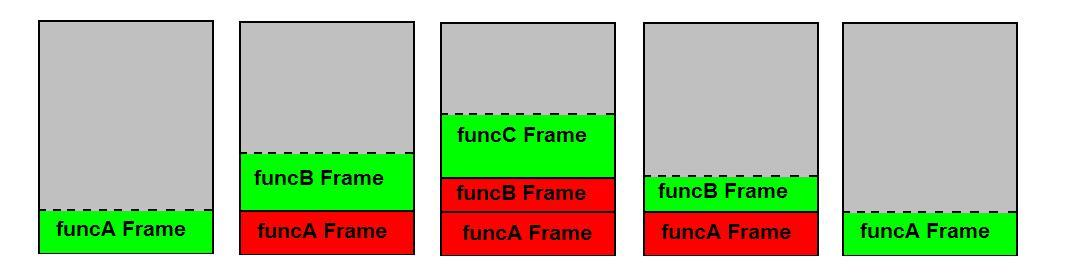
Fonctionnement de la stack (2/2)
Chaque stackframe va contenir la plupart des variables utilisées par la fonction.
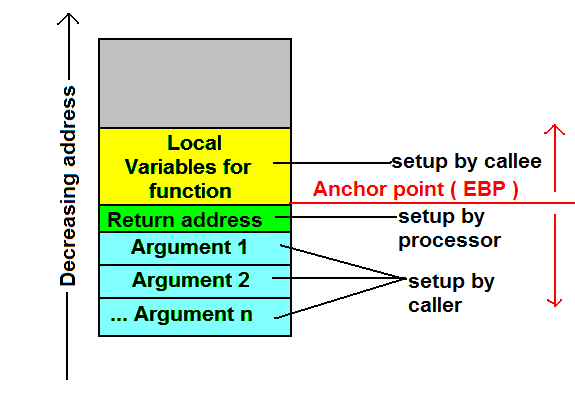
L'allocation mémoire sur la stack est "gratuite", car précalculée à la compilation.
Cela s'oppose à une allocation mémoire sur la Heap, qui va faire appel à l'allocateur mémoire, et potentiellement nécessiter des syscall. A l'instanciation et destruction, les variables sur la Heap sont donc plus coûteuses.
En Rust, le mot clé let permet de déclarer des variables sur la stack. Une contrainte de la stack: la taille doit être connue à l'avance. C'est également une contrainte du trait Copy, coincidence ?
Rust, stack et heap (1/2)
Q:Comment gérer le cas de variables dont on souhaite la taille dynamique ?
A: En allouant dynamiquement de la mémoire, sur la heap.
Exemple: La structure Vector en Rust, qui est un tableau contigu de taille variable (l'équivalent d'un ArrayList Java, ou d'un.. vector en c++).
#![allow(unused)]
fn main() {
// A first way to create a vector
let mut my_first_vector = Vec::new();
println!("my_first_vector: {}", my_first_vector.capacity());
my_first_vector.push(42);
println!("my_first_vector: {}", my_first_vector.capacity());

// An other way
let mut my_second_vector = Vec::with_capacity(1);
println!("my_second_vector: {}", my_second_vector.capacity());
my_second_vector.push(42);
println!("my_second_vector: {}", my_second_vector.capacity());

// Yet another way
let mut i_m_a_pro_at_vector_now = vec![1, 2, 3];
println!("i_m_a_pro_at_vector_now: {}", i_m_a_pro_at_vector_now.capacity());
}
Rust, stack et heap (2/2)
Si on regarde l'implémentation de Vec:
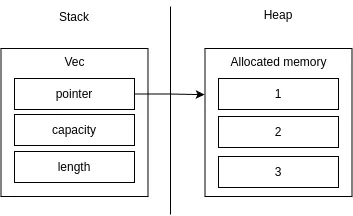
Lorsque l'on veut explicitement stocker une variable sur la heap, on utilise la structure Box.
#![allow(unused)]
fn main() {
let x = Box::new(42);

println!("{:p} => {:p}", &x, &*x);
}
Copy & Clone : Le nom de mon chat #1
Option de correction #1: on fait ce que le compilateur nous dit, ie cloner le nom.
String implémente le trait Clone
struct Cat {
  age: u8,
  name: String,
}

impl Cat {
 fn species(&self) -> String {
     "cat".to_string()
 }

 fn age(&self) -> u8 {
     self.age
 }

  fn name(&self) -> String {
    self.name.clone()
  }
}

fn main() {
  let my_cat = Cat { age: 2, name: "Grispoil".to_string() };

  println!("This is a {}.", my_cat.species());
  println!("It is {} years old.", my_cat.age());
  println!("Its name is {}.", my_cat.name());
  println!("Its memory footprint is {} byte(s).", size_of_val(&my_cat));
}
L'appel à clone est volontairement explicite pour rappeler au développeur que c'est une opération potentiellement coûteuse.
Copy & Clone : Le nom de mon chat #2
Option de correction #2: on comprend ce que l'on fait.
struct Cat {
  age: u8,
  name: String,
}

impl Cat {
 fn species(&self) -> String {
     "cat".to_string()
 }

 fn age(&self) -> u8 {
     self.age
 }

  fn name(&self) -> &str {
    &self.name
  }
}

fn main() {
  let my_cat = Cat { age: 2, name: "Grispoil".to_string() };

  println!("This is a {}.", my_cat.species());
  println!("It is {} years old.", my_cat.age());
  println!("Its name is {}.", my_cat.name());
  println!("Its memory footprint is {} byte(s).", size_of_val(&my_cat));
}
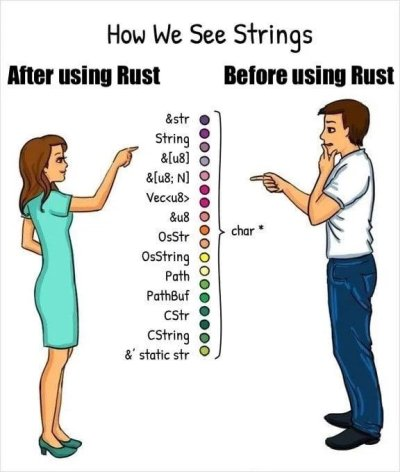
Parenthèse: les String en Rust, c'est pas si simple
Un autre cas perturbant: Move semantic
#![allow(unused)]
fn main() {
let x = 42;
// That's a copy, both x and y are owned
let y = x;
println!("{}", y);
println!("{}", x);

}
#![allow(unused)]
fn main() {
let x = "Hello world".to_string();
// That's NOT a copy, s ownership is transfered
let y = x;

println!("{}", y);
println!("{}", x);

}
En Rust, le cas par défaut est un move lors de l'affectation. Une exception implicite s'applique aux types qui implémente Copy.
Implémentation par défaut
Le compilateur Rust est capable de générer des implémentations par défaut pour certains traits.
C'est par exemple le cas pour Copy et Clone.
#![allow(unused)]
fn main() {
struct Point {
  x: i32,
  y: i32,
}

let a = Point {x: 0, y: 1 };
// Move
let b = a;
// Error
println!("x_a={}", a.x);
}
#![allow(unused)]
fn main() {
#[derive(Clone)]
struct Point {
  x: i32,
  y: i32,
}

let a = Point {x: 0, y: 1 };
// a & b are both owned
let b = a.clone();

println!("x_a={}", a.x);
}
#![allow(unused)]
fn main() {
#[derive(Clone, Copy)]
struct Point {
  x: i32,
  y: i32,
}

let a = Point {x: 0, y: 1 };
// Copy
let b = a;

println!("x_a={}", a.x);
}
Encore un cas perturbant: Les boucles
#![allow(unused)]
fn main() {
let strings = vec!["a", "b", "c"];

for s in strings {
  println!("{}", s);
}
}
#![allow(unused)]
fn main() {
let strings = vec!["a", "b", "c"];

for s in strings {
  println!("{}", s);
}

for s in strings {
  println!("{}", s);
}
}
Trait: IntoIterator
#![allow(unused)]
fn main() {
let strings = vec!["a", "b", "c"];

for s in &strings {
  println!("{}", s);
}

for s in strings.iter() {
  println!("{}", s);
}
}
Comment Rust gère la mémoire
On a vu que les variables déclarées sont systématiquement sur la stack. La gestion mémoire de Rust est couplée à la durée de vie de chaque variable.
// Lifetimes are annotated below with lines denoting the creation
// and destruction of each variable.
// `i` has the longest lifetime because its scope entirely encloses
// both `borrow1` and `borrow2`. The duration of `borrow1` compared
// to `borrow2` is irrelevant since they are disjoint.
fn main() {
    let i = 3; // Lifetime for `i` starts. ────────────────┐
    //                                                     │
    { //                                                   │
        let borrow1 = &i; // `borrow1` lifetime starts. ──┐│
        //                                                ││
        println!("borrow1: {}", borrow1); //              ││
    } // `borrow1` ends. ─────────────────────────────────┘│
    //                                                     │
    //                                                     │
    { //                                                   │
        let borrow2 = &i; // `borrow2` lifetime starts. ──┐│
        //                                                ││
        println!("borrow2: {}", borrow2); //              ││
    } // `borrow2` ends. ─────────────────────────────────┘│
    //                                                     │
}   // Lifetime ends. ─────────────────────────────────────┘
Rust apporte ainsi la garantie que la mémoire est parfaitement gérée, les ressources étant automatiquement désallouées pour nous dès que leur lifetime expire (ie bien souvent, dès qu'elles sortent du scope).
Drop: le destructeur
Trait: Drop
struct Cat {
  age: u8,
  name: String,
}

impl Drop for Cat {
  fn drop(&mut self) {
    println!("{} destroyed", self.name);
  }
}

fn main() {
  let cat_1 = Cat { age: 2, name: "Grispoil".to_string() };

  {
    let cat_2 = Cat { age: 18, name: "Berlioz".to_string() };
  }
}
Lifetime explicite
Lorsque l'on souhaite stocker des références dans des structures de données, le compilateur a besoin d'information pour connaitre la relation entre les durées de vie des données.
#![allow(unused)]
fn main() {
struct Necklace {
  text: String,
}

struct Cat {
  necklace: &Necklace,
}

let my_necklace = Necklace { text: "Purr".to_string() };
let my_cat = Cat {necklace: &my_necklace };
}
#![allow(unused)]
fn main() {
struct Necklace {
  text: String,
}

struct Cat<'a> {
  necklace: &'a Necklace,
}

let my_necklace = Necklace { text: "Purr".to_string() };
let my_cat = Cat {necklace: &my_necklace };
}
Utiliser les traits pour généraliser
trait Pet {
    fn age(&self) -> u8;
}

struct Cat {
    age: u8,
}

impl Pet for Cat {
    fn age(&self) -> u8 {
        self.age
    }
}

struct Dog {
    age: u8,
}

impl Pet for Dog {
    fn age(&self) -> u8 {
        self.age
    }
}

// Errors
fn print_pet(pet: Pet) {
    println!("The pet's age is {}", pet.age());
}

fn main() {
    let my_cat = Cat { age: 2 };
    let my_dog = Dog { age: 10 };
    print_pet(my_cat);
    print_pet(my_dog);
}
Option 1: Dynamic dispatch
trait Pet {
    fn age(&self) -> u8;
}

struct Cat {
    age: u8,
}

impl Pet for Cat {
    fn age(&self) -> u8 {
        self.age
    }
}

struct Dog {
    age: u8,
}

impl Pet for Dog {
    fn age(&self) -> u8 {
        self.age
    }
}

// Errors
fn print_pet(pet: Box<dyn Pet>) {
    println!("The pet's age is {}", pet.age());
}

fn main() {
    let my_cat = Box::new(Cat { age: 2 });
    let my_dog = Box::new(Dog { age: 10 });
    print_pet(my_cat);
    print_pet(my_dog);
}
Option 2: Static dispatch
trait Pet {
    fn age(&self) -> u8;
}

struct Cat {
    age: u8,
}

impl Pet for Cat {
    fn age(&self) -> u8 {
        self.age
    }
}

struct Dog {
    age: u8,
}

impl Pet for Dog {
    fn age(&self) -> u8 {
        self.age
    }
}

// Errors
fn print_pet<T: Pet>(pet: T) {
    println!("The pet's age is {}", pet.age());
}

fn main() {
    let my_cat = Cat { age: 2 };
    let my_dog = Dog { age: 10 };
    print_pet(my_cat);
    print_pet(my_dog);
}
Une autre façon de faire la même chose (syntactic sugar)
trait Pet {
    fn age(&self) -> u8;
}

struct Cat {
    age: u8,
}

impl Pet for Cat {
    fn age(&self) -> u8 {
        self.age
    }
}

struct Dog {
    age: u8,
}

impl Pet for Dog {
    fn age(&self) -> u8 {
        self.age
    }
}

// Errors
fn print_pet(pet: impl Pet) {
    println!("The pet's age is {}", pet.age());
}

fn main() {
    let my_cat = Cat { age: 2 };
    let my_dog = Dog { age: 10 };
    print_pet(my_cat);
    print_pet(my_dog);
}
Option 3: Dynamic dispatch de référence
trait Pet {
    fn age(&self) -> u8;
}

struct Cat {
    age: u8,
}

impl Pet for Cat {
    fn age(&self) -> u8 {
        self.age
    }
}

struct Dog {
    age: u8,
}

impl Pet for Dog {
    fn age(&self) -> u8 {
        self.age
    }
}

// Errors
fn print_pet(pet: &dyn Pet) {
    println!("The pet's age is {}", pet.age());
}

fn main() {
    let my_cat = Cat { age: 2 };
    let my_dog = Dog { age: 10 };
    print_pet(&my_cat);
    print_pet(&my_cat);
    print_pet(&my_dog);
    print_pet(&my_dog);
}
Option 4: Static dispatch de référence
trait Pet {
    fn age(&self) -> u8;
}

struct Cat {
    age: u8,
}

impl Pet for Cat {
    fn age(&self) -> u8 {
        self.age
    }
}

struct Dog {
    age: u8,
}

impl Pet for Dog {
    fn age(&self) -> u8 {
        self.age
    }
}

// Errors
fn print_pet(pet: &impl Pet) {
    println!("The pet's age is {}", pet.age());
}

fn main() {
    let my_cat = Cat { age: 2 };
    let my_dog = Dog { age: 10 };
    print_pet(&my_cat);
    print_pet(&my_cat);
    print_pet(&my_dog);
    print_pet(&my_dog);
}